ROLE
UX/UI Designer
TEAM
just me :)
TIMELINE
One semester
PLATFORM
Mobile + Desktop
PLAYROOM
Exploring how interaction, sound, and generative AI visuals can recreate the feeling of play.

Overview
Playroom is an experimental project that explores how digital experiences can evoke emotional memory. Instead of focusing on usability or efficiency, the project investigates how interaction design, sound, and generative AI visuals can recreate the feeling of play from a pre-digital childhood.

Context
Having worked with children, I started noticing how play was changing. What used to be physical, open-ended, and driven by imagination was becoming more structured and screen-based.
The Question
Before screens, play was tactile, open-ended, and unpredictable — driven by curiosity rather than clear goals. In contrast, most digital experiences are structured and outcome-driven. This raises the question of whether an interface can capture the feeling of play, not just its form.
What does play feel like and how can a digital interface recreate it?
What Makes This Different
This project does not optimise for usability, speed, or task completion.
That sentence is worth sitting with, because it goes against almost everything interaction design is trained toward. No clear user journey. No reduced friction. No measurable outcome.
Instead, the primary design drivers were emotion, curiosity, and memory. The question asked of every decision wasn't "is this clear?" but "does this feel like something?"
Approach
Emotional and experiential references
The research for this project didn't start with user interviews. It started with objects. Childhood toys, analogue instruments, things that had weight and texture and behaved slightly unpredictably. The references that shaped the design were:
Tactile toys with resistance — the kind that pushed back
Sound as immediate feedback — a xylophone, a music box, things that responded the moment you touched them
Objects that had no instructions — you figured them out by trying
Imperfection as character — a slightly wobbly spin, a note that wasn't quite in tune
No clear goal
The experience has no completion state
Discovery over efficiency
Tothing is labelled. You learn what things do by touching them.
Every interaction is different
The same action produces slightly different results each time.
Sound as feedback
Audio responds to interactions
Imperfection over polish
Rough edges are kept.

From Prompt to Interaction

Role of AI
AI was not used to generate final visuals, but as a dynamic material within the experience itself.
In many current workflows, AI is used to produce static outputs, images, assets, or entire screens. In this project, I explored a different approach: integrating generative visuals directly into the interaction layer of the product.
AI as Interaction, Not Output
Each “toy” in the playroom behaves differently, combining motion, sound, and generative visuals to create a unique response. This introduces variability and unpredictability — key qualities of physical play — into a digital environment.
Rather than guiding the user toward a specific outcome, the system encourages exploration. The experience is not about completing an action, but about discovering how each interaction behaves.
Information Architecture Map
The Experience

The experience opens with a short introduction that sets the tone of the playroom, followed by a simple paper-like instruction that appears and then fades away. Rather than guiding the user step by step, it offers just enough direction to begin, encouraging exploration instead of control.
The Toys
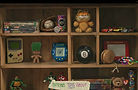
The toy section is where users explore the playroom through interaction. Each toy responds differently, encouraging curiosity, experimentation, and discovery rather than following a fixed path.
Patterns of Play

The Patterns of Play page expands beyond the individual experience to explore play more broadly. It is divided into three parts: the benefits of play, the shift from physical to digital environments, and current trends in the toy market. Together, these layers provide context for how play has evolved and what shapes it today.
About

The About page provides context for the project, explaining the idea behind the playroom and the intention to recreate the feeling of play in a digital space. It frames the experience as an exploration of interaction, emotion, and generative design rather than a traditional product.
Key Design Decisions
Typography +
Grafic Elements
To stay consistent with the realism of the toys, the typography and graphic elements were designed to feel like part of the same physical world. Instead of treating text as a typical UI layer, I approached it as a material, something that exists within the environment.
This meant moving away from standard interface conventions like floating cards or rounded containers, and instead using elements that feel tangible and familiar. Typography appears on surfaces like paper, with handwritten styles and simple, imperfect forms that reflect how children interact with the physical world.

Drawing Style
The diagrams use a simplified, hand-drawn style to break down more complex ideas into something easy and approachable. By borrowing from children’s drawing language, they stay consistent with the overall tone of the playroom, making explanations feel more intuitive and less technical.

Toy Pages
The toy pages are designed to feel like interacting with a real object rather than a structured interface. Information is arranged as hand-drawn annotations around the toy, creating a loose, exploratory layout that encourages curiosity and discovery over rigid hierarchy.
Mobile

The mobile experience was designed alongside desktop, not as an afterthought. This was important to ensure the same feeling of play and exploration carried through, even on a smaller screen.
Adapting the experience required rethinking interactions — especially without hover — and finding new ways to translate the same behaviors into tap-based interactions while maintaining the overall tone and flow.
Summary & Takeaway
Playroom explores how a digital interface can recreate the feeling of play. Instead of focusing on usability, the project centers on emotion, using interaction, sound, and generative AI visuals to create a more open, tactile, and exploratory experience.
Takeaways
Designing for feeling requires more freedom and less structure
AI can be part of the experience, not just a tool
Physical references make digital feel more real
Interaction details shape the overall emotion
Designing across devices in parallel leads to stronger decisions
