TEAM
2 Designers
ROLE
UX/UI Designer
PLATFORM
Mobile + Desktop
TIMELINE
One semester
TELEM
Tackling one of the IDF's most fragmented operational systems, soldier training management.

Overview
TELEM is a digital platform designed to support training management across multiple levels of the military system. The project addresses the lack of a unified, real-time view of trainee progress, which leads to fragmented decision-making and operational gaps. By centralizing information and aligning it with the daily workflow, the system enables clearer oversight, better coordination, and more informed decisions.


Work Process
Research
Interviews
HMW
10-star experience
Existing tools
Competitive audit
Define
Root problem
principles
personas
Information architecture map
Design
Hand sketches
V1 wireframes
Hebrew interface
Interactive prototype
Validate
Tested W/ IDF commanders
Reflection
Takeaways
The Problem
The IDF runs complex training operations on WhatsApp and Excel.
On the surface, it looked like a technology problem. Fragmented tools, no integration, manual data entry.
But the more we dug, the more we realized: the tools weren't the root cause. They were a symptom.
The real problem was that nobody had ever designed for the actual flow of human information inside a training system. who needs to know what, at what moment, in what form. Critical information about soldiers existed somewhere in the system, It just never reached the right person in time where it mattered.
The root problem: Lack of a current, complete, and unified picture of every soldier available to the people responsible for them.
Lack of ongoing tracking and management
Creates a situation where soldiers 'fall between the cracks,' advance without proper check-ins, and receive guidance that doesn't match their actual status
No standard and no unified operational system.
Creating chaos, lack of unified action, and critical information gaps between commanders and higher ups.
Dozens of tools to manage training. Scattered systems
Having to update others manually, blind spots, and loss of control over the training flow.
Lack of a current, complete, and unified picture of every soldier
Fragmented and non-sequential communication
How Real Conversations Shaped Our Research
Behind the system are people navigating complex, often overwhelming situations. Their challenges go beyond usability, they impact daily decisions, performance, and well-being.
Who It Affects
Through research, we found that this problem impacts multiple levels of the military training system. We identified four key groups affected: soldiers in training, commanders, officers, and training base commanders. We conducted interviews across these roles to better understand the problem and uncover opportunities not only to address it, but to improve the overall system.
Role
Soldiers
Squad Commanders
Officers
Receive reports that are uneven and no human context behind them
Training base commanders
Pain Point
Don’t know their own status, how they are evaluated, or what’s coming
Track 12+ soldiers manually across many different platforms tools
Described a system that generates enormous amounts of data but almost no actionable insight.
*This is the short short summery of long conversations with these different ranks
During our conversations with commanders, an interesting pattern emerged: the way they described their challenges naturally followed the structure of a daily schedule.
We asked commanders to walk us through a typical day and flag moments where something felt stuck or missing.
Before bed
We realized that the core problem wasn’t isolated to specific moments, it followed commanders throughout the entire day. This helped us understand not only where support was needed, but what kind of support was missing at each stage. We later used this daily structure as a guide for our user flow, ensuring no critical moments were overlooked.
How Might We
From our interviews, we generated HMW questions and clustered them into six themes.
Information Flow
transferring information faster and simpler
Visibility & Awareness
Real-time soldier status
Soldier-Centric
Real people behind the date points
Prediction & Early Warning
Predict, don’t just react
Ownership
Real control
Leadership Insight
Make better decision and grow as a commander
10 Star Experience
We used this method to get past what people think they want and find what they actually need. At 5 stars people describe features. At 10 stars they describe feelings and that's where the real design brief lives.
1-5 stars
Consolidation
all information in one place
7-6 stars
Define
Surface problems before they happen
8-9 stars
Ideate
Stop managing logistics, start managing people
10 stars
Human Growth
The commanders evaluate themselves, not just their work
The highest aspiration wasn't operational efficiency. It was personal growth through better human connection.
Principle
Live
One platform
Focused
Guidance
Rank and role-adapted
Definition
Every piece of information in TELEM updates automatically. The commander opens the app and sees the current truth
TELEM connects commanders, officers, welfare, and upper command in a single information environment.
The system surfaces what matters right now. Everything else exists but doesn't compete for attention. This was the hardest principle to hold.
TELEM doesn't present information and leave the commander to figure out what to do. It suggests, recommends, and shows the path, while keeping the decision in the commander's hands.
A soldier, a squad commander, a company officer, and a base commander are not the same user. The same underlying data displays differently depending on who is looking at it.

Context
Her day is fast-paced and fragmented. Information comes from conversations, observations, reports, and multiple tools, requiring her to constantly piece together a complete picture. Most decisions are made in short windows between activities, often under pressure and with limited visibility.
Pain Points
• Information scattered across multiple sources
• Lack of transparency and up-to-date data
• High cognitive load when making decisions under pressure
Rony Bar-Lev
19 Years old | Squad Commander | Basic Training (02)
Overview
Rony leads a class of 15 soldiers throughout basic training. She is responsible for their progress, discipline, and overall wellbeing, while operating within a tightly structured and time-sensitive schedule.
Needs
• A clear, real-time understanding of each soldier’s status
• The ability to quickly prioritize throughout the day
• Information that fits into short decision windows

Monika Melamed
21 Years old | Officer | Basic Training (02)
Context
Her role is less about direct interaction and more about understanding the bigger picture. Information reaches her through reports from commanders, often summarized and sometimes incomplete. She needs to quickly assess situations across multiple classes, identify gaps, and ensure consistency in both performance and training quality.
Pain Points
• Lack of consistent and comparable data across classes
• Limited visibility into the context behind reported information
• Difficulty identifying gaps and maintaining alignment between units
Overview
Monika oversees three training classes, each led by a commander and composed of 12–15 soldiers. She is responsible for maintaining alignment across units, ensuring training standards are met, and making higher-level decisions based on incoming information.
Needs
• A clear overview of all classes in one place
• The ability to compare performance and progress across units
• Reliable, structured information for decision-making
Market Research
Before designing, we mapped the landscape across five categories: current IDF tools, direct competitors, adjacent solutions, large institutional platforms, and enterprise UX trends. The goal was to understand the gap.
Across all categories, the pattern was clear: tools are either too generic, too narrow, or built for administration rather than people. Nothing supports field commanders making fast decisions, often from their phone. Inside the IDF, this gap is most visible, WhatsApp, Excel, and paper are the system.
Definition
Before touching the UI, we articulated five principles for the system.
Persona
To focus our design, we defined a primary user and built the product around their experience. Rather than designing for all four user groups, we prioritized two, allowing us to go deeper and develop a clearer solution.
Information Architecture Map


Updates
Tasks

Next event
Home page starts with schedule
Personal attention
Design
Hand drawn wireframes
Our initial sketches explored a comprehensive approach to the system, bringing together key features and information into a single, unified structure.
A Shift in Direction
While this approach felt intuitive, revisiting our research revealed a mismatch. Commanders don’t need more information, they need clarity. Surfacing everything at once increased cognitive load instead of reducing it. This led us to rethink the role of the home screen. Rather than acting as a central hub for all information, it needed to reflect the commander’s daily flow and highlight what matters in the moment.
The result was a shift toward a schedule-based home screen, organizing information by time and priority, and ensuring that only the most relevant actions surface at each stage of the day.


Final Design
Commander- Mobile app
Schedule
The commander's daily view. every training activity, formation, and commitment laid out in order. Urgent actions surface at the top automatically so the most important thing is always the first thing seen. Designed to be checked in seconds
Alerts
Real-time updates about soldiers that need attention, a missed session, a welfare flag, a status change. Each alert includes full context and a direct path to resolution. The goal is never just to notify, it's to help the commander act.
Tasks
Everything that needs to be done, approved, or followed up on. Leave requests, pending approvals, assigned missions. Organized by urgency so the commander always knows what can wait and what can't.
End of day report
A daily summary that builds itself throughout the day from logged events, alerts, and resolved tasks. Instead of reconstructing the day from memory at 10pm, the commander reviews, adds any personal notes, and submits. What used to take an hour takes minutes.
User Flow

Features



System Recommendation
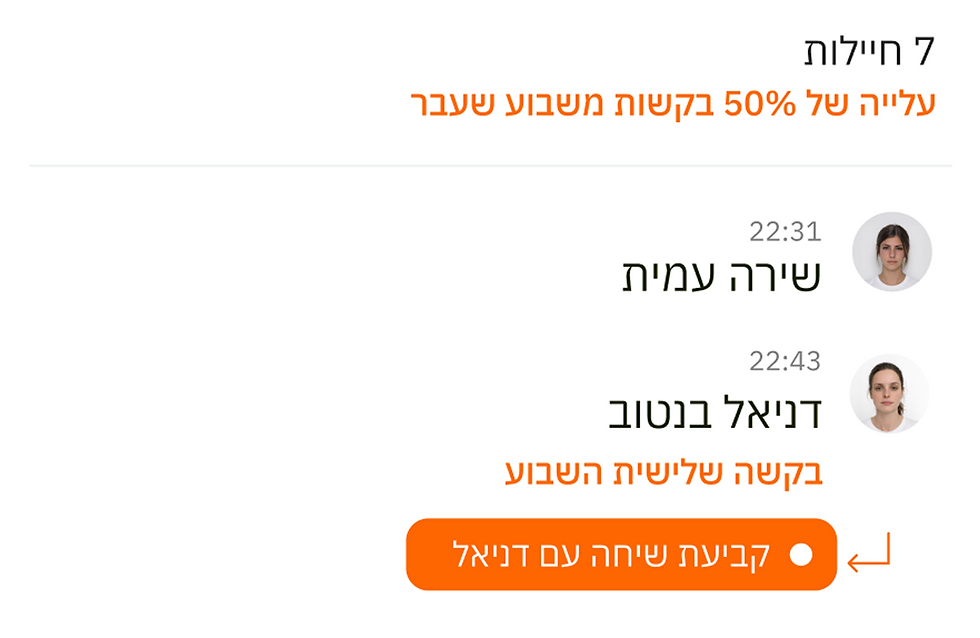
When an issue is detected, the system analyzes it and suggests where it can be resolved within the schedule, helping commanders act quickly without manual planning. For example, if a gap is identified in a soldier’s sleep schedule, the system proposes where those missing hours can be integrated into the day.
Pattern Recognition & Guidance
The system doesn’t just surface individual issues, it identifies patterns over time and brings them to the commander’s attention, supporting both operational and human decisions. For example, an increase in medical requests is highlighted as a broader trend, while repeated requests from a specific soldier trigger a recommendation to check in, helping the commander respond before issues escalate.
Performance Overview
The system transforms results into a clear performance overview. After an exam, the commander can quickly understand the class situation. from averages and absences to individual progress, including changes from previous scores, enabling faster and more informed follow-up.
Schedule-Based Guidance
The schedule acts as a guiding layer, not just a timeline. It highlights upcoming actions and suggests how to prepare for them. For example, before a lesson, the system prompts the commander to gather necessary materials, while surfacing relevant updates (such as an officer joining the session) directly within the flow.

Officer- Desktop app
The officer experience was designed as a more focused flow compared to the commander’s app. As a team of two, we chose to prioritize a single, high-impact moment rather than building a full system. We centered the design around the end-of-day briefing — a key point where information is summarized, decisions are made, and communication between commanders and officers takes place. This allowed us to capture the officer’s core responsibilities while addressing one of the most critical gaps in the current system: the transfer of clear, reliable information.
The meeting page is designed to support a clear and focused flow. At the top, all discussion topics are visible, allowing the officer to quickly understand what will be covered. The main section breaks down each class by the current topic, showing both what happened and how it was addressed (based on the daily reports submitted by commanders). At the bottom, a dedicated space allows the officer to take notes, mark items as resolved, or flag them for follow-up.
User Flow

Features


Cross-Class Scheduling & Recommendations
The system supports real-time schedule adjustments by identifying opportunities across multiple classes simultaneously. It allows the officer to compare schedules side by side and act on shared gaps, rather than managing each class separately. For example, during the meeting, the system detects a time window where all three classes are on break and suggests integrating a new activity. Once approved, the update is applied across all classes at once.
Adaptive System Preferences
The system provides recommendations and alerts, but keeps control in the hands of the user. Preferences can be adjusted to better fit the needs of the unit and its specific context. For example, if repeated medical requests are only flagged after the third time, the officer can choose to surface them earlier, ensuring issues are addressed sooner and aligned with their judgment.
User Testing
Due to the scope and context of the project, we focused our validation on targeted qualitative feedback rather than a full testing cycle.
We presented the final prototype to three commanders from different units, allowing us to gather perspectives across varied training environments.
These sessions focused on understanding how the system fits into real workflows, what felt valuable, and where it could meaningfully support their day-to-day decision-making.
End-of-Day Summary Report
At the end of the meeting, the system generates a structured summary that consolidates key insights across all topics. It compares performance and events between classes, helping the officer identify gaps, maintain alignment, and ensure a consistent standard across the unit. Rather than reviewing each class separately, the officer gets a clear, comparative overview that supports informed decisions and follow-up actions.
Key takeaways
Main point
Clarity over complexity
Direction validated
Overall, the feedback reinforced the importance of reducing cognitive load, supporting decision-making, and maintaining flexibility within a structured system.
Explanation
Participants highlighted the importance of quickly understanding what requires attention, especially in fast-paced environments. The system’s structure felt familiar and aligned with how they already think about their day.
Balance between support and control
While the system’s ability to surface insights was seen as valuable, participants emphasized the need to adapt it to their own judgment and conte
Summary & Takeaway
What started as a logistics-heavy system quickly revealed a more human story. Beyond schedules and data, the project highlighted the people behind the system, and the importance of designing with that perspective.
Moving forward, the next steps would include expanding the system across all user roles and conducting deeper usability and accessibility testing to refine the experience.